|
Making An Env_Beam
First of course build your map. Then
place an env_beam entity in your map, most
likely next to where
the beam will emit from so you can find it later on if you have
to edit it.
Then you can make the brush where the beam will start from and make it
a func_brush(any entity will do)
entity and name it.
Then place an info_target entity (again any
entity will do) at the spot where beam
will end it's travel and name it.
Ok let's start with the env_beam entity
Properties
There are many options, you can select the color of the beam, parent it
to another entity, etc.
Main ones are width of beam,
amount of noise (more noise = more erratic
of a beam(lightning),
less noise = a straight line), you can browse thru the different
sprites available for it also.
Then you need to select the Start Entity
and then the Finish Entity. Which is where
the beam will
start and finish at. You can also name the env_beam and have something
trigger it on or select random
strike in flag options.
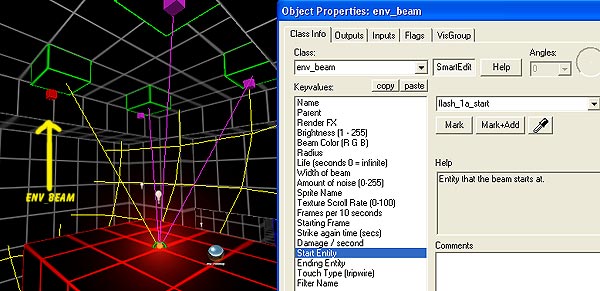
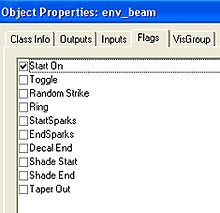 Also
look at the flags tab and check off options wanted such as Start
On Also
look at the flags tab and check off options wanted such as Start
On
Then simply name your Entity where beam will start
(func_brush in my example)
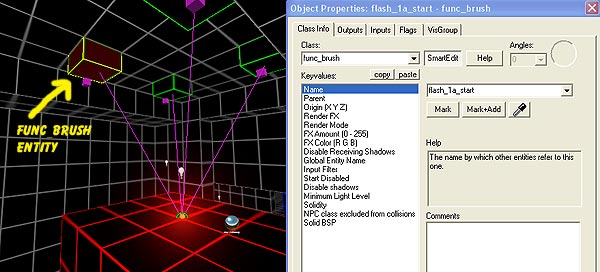
Then name your finish entity (info_target
in my example)
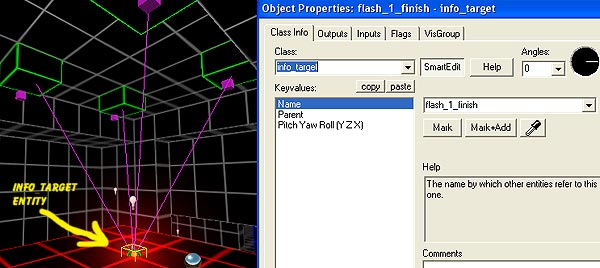
In Hammer Editor the lines should connect showing you the entity path.
(which entitys are connected).
Save map, compile and test it out, then adjust to your liking using the
many options in the property
windows.
you
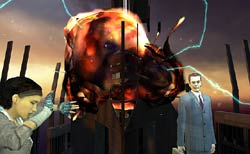
can add env_sprite to give it a glowing appearance (seen in picture above).
|