|
|
Displacement Buttons
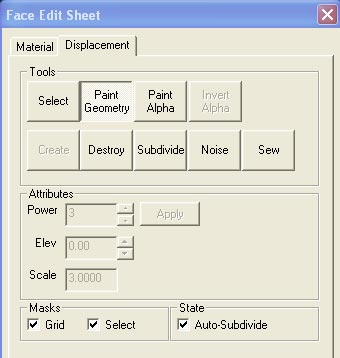
Tools
Select-
usedto select which displacement face to be worked on. (select multiple
faces using Ctrl+left clicking)
Paint Geometry- opens another window,gives
ability to sculp displacement brush
Paint Alpha- gives ability to apply alphs
textures to the displacement brush.(blend textures)
Invert Alpha- Reverses the applied Alpha
texture (seen Below)
Create- Creates displacement brush
Destroy- Returns a displacement brush back
to a normal World Brush
Subdivide- Create a smooth subdivision surface
out of two or more selected displacement surfaces.
Noise- Adds noise to displacement brushes
(random unevenness)
Sew- Connect the edges of two or more selected
displacement surfaces.(Ctrl+left click for multiple brushes)
Attributes
You can change the Power (2,3,4) and use
apply button to apply changes.
Elev- will elevate your displacement brush
up/down from it's current posistion
Scale- will scale your brush up or down depending
on your selection/input
Masks are easy, Grid turns grid on/off. Select
turns on/off the red highlight
State, Auto-Subdivide will do the above subdivide
automatically
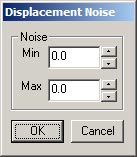 Use this
to set noise amounts Use this
to set noise amounts
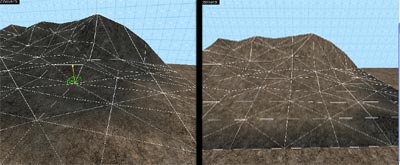 Invert Alpha Invert Alpha
|
|