|
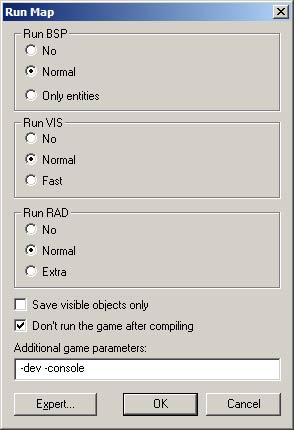
Dialogs: Run Map - Normal Mode
This command allows you to run the utilities that are necessary to compile
the map into the .BSP format usable in the Source engine. The Run Map
dialog will be in Normal or Expert mode, depending on which mode was last
used.
Normal Compile
The Normal compile dialog gives you some very basic control over the compiling
process, enough for simple testing of levels.
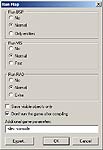
Run BSP, Run VIS, Run RAD
These settings allow you to define which tools will be run along with
a couple of their most basic parameters.
Save visible objects only
If this option is checked, only objects that are not hidden will be compiled
into the map.
Don't run the game
If this option is checked, the game will not be started after the map
has finished compiling.
(use this option until the bug is worked out of
Hammer)
Additional Game Parameters
The text in the Additional Game Parameters text box will be appended to
the game execution command, allowing you to feed special commands to the
engine. If you are compiling a map for a mod, be sure to include the -game
<modname> parameter. (example: -game cstrike)
The parameters -dev and -console, also shown, are useful when testing
maps. The BSP, VIS, and LIGHT processes are all dependent upon the Build
Programs settings in the Options dialog box.
OK
Starts the map compile with the current settings.
Cancel
Exits the Run Map dialog with no changes.
Expert
This button switches the Run dialog to Expert Compile mode.
Dialogs: Run Map - Expert Mode
This command allows you to run the utilities that are necessary to compile
the map into the .BSP format usable in the Source Engine. The Run Map
dialog will be in Normal or Expert (Advanced), depending on which mode
was last used.
Expert compile mode is extremely useful when you want more than the limited
options available to you in the Normal compile settings.
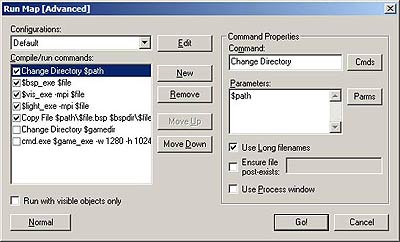
Configurations
Hit the Expert button, then hit the edit
button, then run map configurations window
comes up,
click new, type in the name of game (example:
Counter-Strike Source )
Click "OK" then close
buttons.
Then under Compile/Run Commands line,click the New
button
|